


|
|
||
| Home | Products | Downloads | Order | Support | Applications | Forum | Testimonials | Company | Contact Us | ||
|
|
||
| Hardware Remote Upgrade Request | |
Hardware Remote Upgrade is used to upgrade the software license level associated with the hardware. The hardware can be a USB hardkey or any ADC/DAC hardware manufactured by Virtins Technology. After purchasing a software upgrade, please use the following form to submit your hardware ID (and Serial Number, if applicable), we will generate the corresponding upgrade package file and send it to you via email afterwards. 1. How to obtain the Hardware ID and Serial Number? Plug in the hardware, and then on Windows desktop, go to [Start] > [All Programs] > [Multi-Instrument] > [VIRTINS Hardware Upgrading Tool] to launch the Hardware Upgrading Tool, the following dialog box will pop up with the hardware ID displayed. (press Read Hardware ID button if it is not displayed) 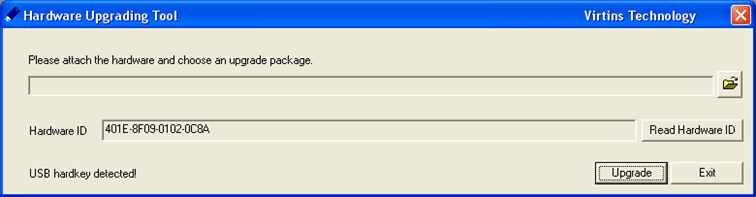 Apart from the Hardware ID, some VT hardware such as the second-generation DSOs also have a Serial Number (S/No.). In this case, the S/No. will also be displayed in the dialog box and is required for Hardware Remote Upgrade Request. 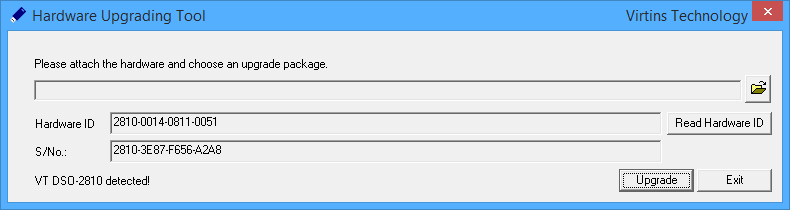 2. How to upgrade the license level associated with the hardware After you receive the upgrade package file, you can upgrade the hardware by yourself. Plug in the hardware, and then on Windows desktop, go to [Start] > [All Programs] > [Multi-Instrument] > [VIRTINS Hardware Upgrading Tool] to launch the Hardware Upgrading Tool, the following dialog box will pop up. Press the File Load button to select the upgrade package file corresponding to the hardware ID, and then press "Upgrade". 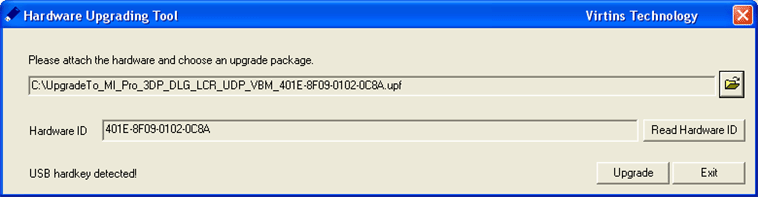 HARDWARE REMOTE UPGRADE REQUEST FORM |
| Home | Products | Downloads | Order | Support | Applications | Forum | Testimonials | Company | Contact Us |
 |